Permissions
Every connection reads. Each step after that is a separate permission, chosen on the consent screen. Direct writes are only for keys an Admin issues in Integration Hub.
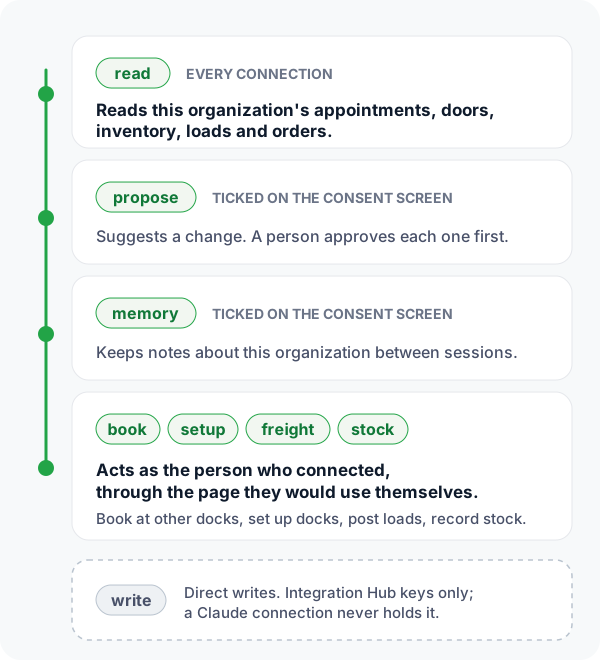
| Scope | Lets the agent | How a connection gets it |
|---|---|---|
read | read the organization's data | Every connection and every key. |
propose | propose changes for an Admin to approve | A box on the consent screen, off unless ticked. Each proposal waits for a person to approve it. |
memory | keep notes between sessions | A box on the consent screen, off unless ticked. |
book | book appointments at other organizations' docks | A box on the consent screen; ticked in advance for a carrier or broker with no dock of its own. |
setup | add facilities and doors | A box on the consent screen; ticked in advance for a warehouse with no dock set up yet. Needs an Admin or Manager. |
freight | turn sales orders into loads and post them | A box on the consent screen, shown when the freight module is on. |
stock | record stock in and out | A box on the consent screen, shown when Inventory is on and never ticked in advance. Needs an Admin, Manager or Inventory volunteer. |
write | write directly to the organization's data | An Integration Hub key only. A Claude connection can never hold it. |
An agent sees the facilities of the person who approved it. If that person can see two of five facilities, so can the agent. Loads, orders, carriers, customers and users are organization-wide and are not limited.
The consent screen
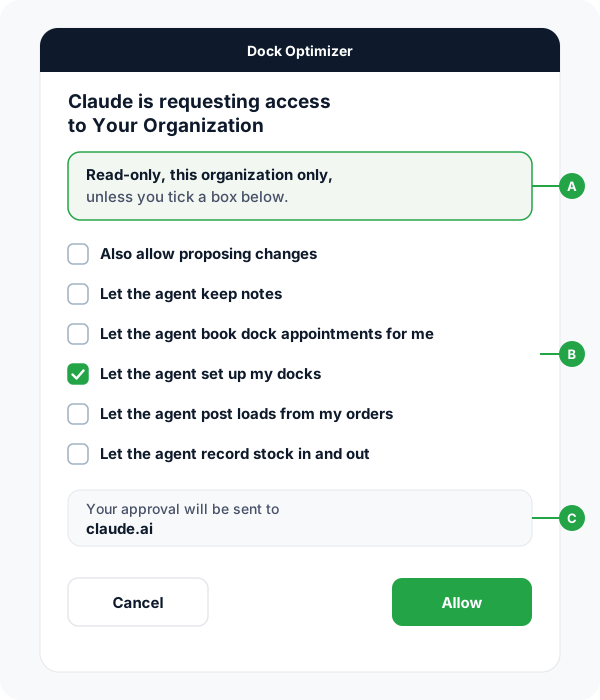
The person connecting sees exactly what the agent will be able to do before anything is granted.
- ARead-only by default. Without a box ticked, the agent reads this one organization and changes nothing.
- BOne box, one permission. Boxes appear only where they apply: posting loads needs the freight module, recording stock needs Inventory. Recording stock is never ticked in advance, because it changes quantities at once.
- CWhere the approval goes. Anyone can register a client and call it "Claude", so the screen names the address the approval is sent to. That is the one detail a look-alike cannot fake.
The Admins and Managers of the organization get a notice in the bell when someone connects an agent, naming who, which agent and what it may do.
What happens to one request
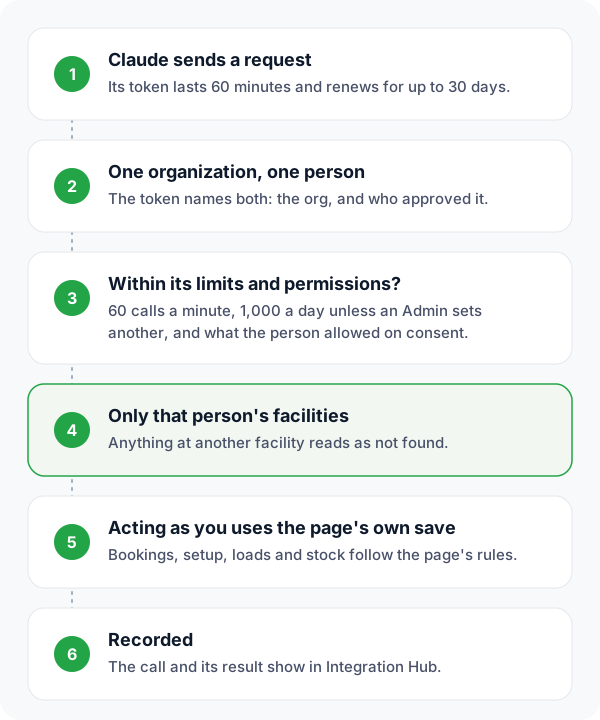
Every call passes these checks before any data is read.
Limits
60 calls a minute per connection, and 1,000 a day unless an Admin sets another limit. Over the minute limit the server answers 429 with Retry-After in seconds.
Facilities
A list leaves out rows at other facilities. Asking for one by id, or passing its id to a tool, gets the same "not found" as an id from another organization, so the limit cannot be probed. A row with no facility, such as an organization-wide closure, stays visible.
Acting as a person
Booking, dock setup, posting loads and recording stock run the web page's own save as the person who connected, so the page's rules apply: FMCSA checks, hours, closures, held stock and quantity caps.
Analysis tools
Answers, not rows. Each one is the same computation as the page that shows it, and is open to the same plans. Start with org_overview: it says what is set up, which analyses have data, and which are closed to the organization's plan.
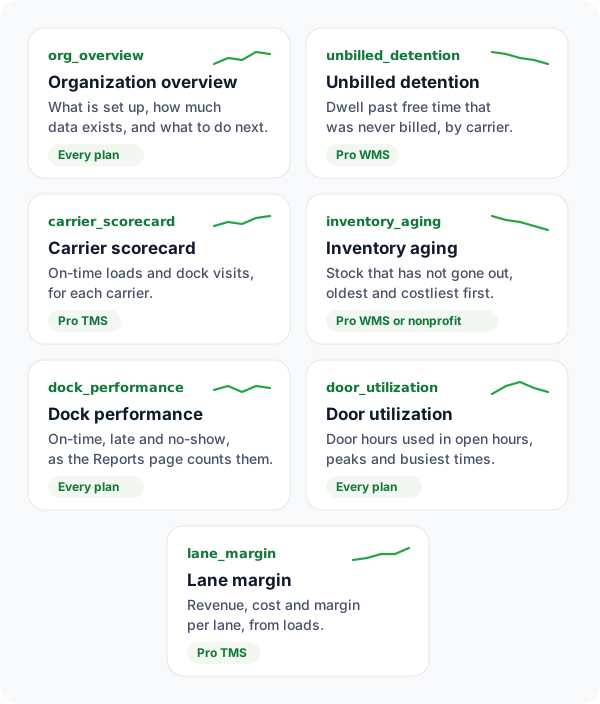
org_overviewOrganization overview
Call this FIRST in a new conversation.
unbilled_detentionUnbilled detention
Detention earned at this organization's docks and never charged: every visit in the window whose dwell (check-out minus check-in) ran past free time and has no detention charge, with the dollar value at the organization's rate, the total by carrier, and the detention already billed in the same window.
carrier_scorecardCarrier scorecard
How reliable each carrier is, from two lenses: awarded loads (pickup and delivery on-time against the load's committed dates, spend, dwell) and dock visits for every carrier that books here (appointments, arrivals, no-shows, dwell).
inventory_agingInventory aging
Stock on hand grouped by days since it last went out (0-30, 31-60, 61-90, 90+, never), with the value tied up in each group and the slowest items first.
dock_performanceDock performance
How appointments at this organization's docks turned out: how many arrived on time or late, no-showed, were cancelled or rescheduled, average dwell, the busiest weekdays and hours, the hours with the worst on-time and no-show record, each carrier's record, and each facility's.
door_utilizationDoor utilization
How much door time each facility used against the hours it is open: utilization %, used and blocked door-hours, visits, median minutes on a door, the wait from check-in to a door, peak doors in use and when, the busiest hours, and each door's use.
lane_marginLane margin
Margin by lane for a broker: revenue (customer rate), carrier cost and margin per origin-destination lane over loads picked up in the window, with margin %, per load and per mile, unpriced loads (a customer rate but no carrier cost yet) kept out of the money, and the thinnest lanes.
Admin controls
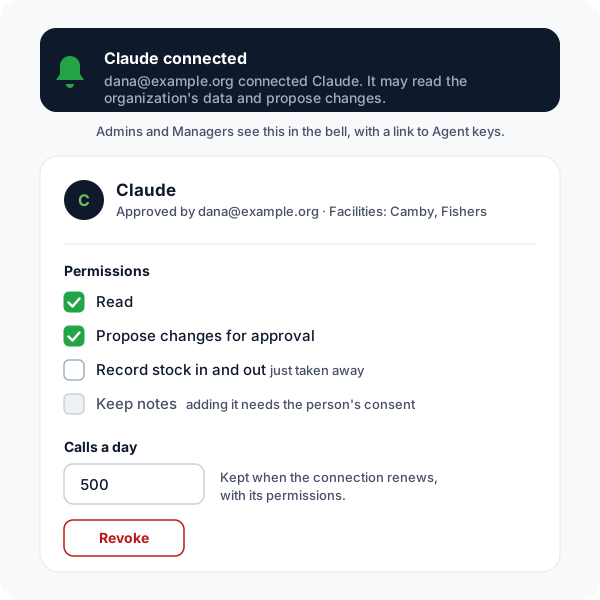
Agent keys in Integration Hub is open to Admins and Managers.
- Take a permission away from a Claude connection without the person reconnecting. Adding one needs that person's consent again.
- Choose permissions for a key you issue. A new key reads only until you tick more.
- Set a daily call limit. It and the permissions carry over when the connection renews each hour.
- See who approved each agent and which facilities it sees.
- Revoke a connection or key. It stops working on its next call.
- Read the activity: recent calls, results and counts per agent.
Connecting Claude
Claude connects as a custom connector over OAuth 2.1 with PKCE and dynamic client registration. Nobody pastes a key: point Claude at the connector URL and it finds the rest.
- Register.
POST /api/mcp/oauth/register(RFC 7591) withclient_nameandredirect_uris, https or loopback only. - Authorize.
GET /api/mcp/oauth/authorizewithcode_challenge_method=S256. The signed-in person sees the consent screen above. - Exchange.
POST /api/mcp/oauth/tokenwith the code andcode_verifier. Codes are single-use and expire in 10 minutes. - Refresh.
grant_type=refresh_token. Each refresh retires the previous token pair, so a stolen refresh token stops working the first time the real client uses its own.
Access tokens last 60 minutes and refresh for up to 30 days. Codes and refresh tokens are pinned to the environment that issued them: a staging token is refused by production. Discovery is at /.well-known/oauth-protected-resource and /.well-known/oauth-authorization-server, and a 401 carries WWW-Authenticate pointing to them.
Integration Hub keys
For an agent that is not Claude, an Admin issues a key in Integration Hub and sends it as a bearer token. Keys are stored only as a SHA-256 hash, belong to one organization, can expire, and can be revoked at once.
Authorization: Bearer do_live_...All calls are JSON-RPC 2.0 to POST /api/mcp/v1/message: initialize, resources/list, resources/read, tools/list and tools/call. Which tools tools/list returns depends on the permissions the caller holds.
{ "jsonrpc": "2.0", "id": 1, "method": "tools/call",
  "params": { "name": "org_overview", "arguments": {} } }
Tools and resources
Both lists are read from the same registry that answers tools/list and resources/list, so they match the server. Full input schemas are in the manifest.
46 tools
| Tool | Approval | What it does |
|---|---|---|
add_asset | Runs on call | Create a new asset (document, certificate, tool, or tracked item). Triggers an AssetAdded notification to configured recipients. Requires 'assets' capability. |
add_doors | Runs on call | Adds dock doors to one of this organization's facilities, the way Door Manager's add-door does. Give a count (named Door N, counting on from the existing ones) or the names. Doors with a name already taken are skipped. |
add_equipment | Runs on call | Create a new piece of equipment (Truck or Trailer) in the fleet registry. Triggers an EquipmentAdded notification to configured recipients. Requires 'equipment' capability. |
adjust_inventory | Runs on call | Set inventory to an absolute quantity (cycle count correction, damage write-off). Creates an audited Adjust transaction with before/after quantities. Requires 'inventory' capability. |
attach_dock_documents | Runs on call | Attaches files to an appointment the connected person or their organization booked, answering its File Upload questions (a BOL that arrived after booking, a packing list), the way the reschedule page's upload does. The time and every other answer stay as they are; a file sent for a question that already has one replaces it. The dock sees it on the appointment and the booker gets an Appointment Updated email. |
book_dock_appointment | Runs on call | Books the appointment in the connected person's name, exactly as their booking on the organization's public page would be: the same checks (carrier MC#/USDOT against FMCSA, hours, closures, capacity), the same confirmation email and the same gate pass. Pass the slot start from find_dock_slots and the answers from get_dock_booking_form keyed by questionId. A refusal says what is missing or wrong and what to do next. Returns the appointment id, the time, and the pass link the driver shows at the gate. Confirm the date, time and facility with the person before calling it. |
cancel_appointment | Runs on call | Cancel an existing appointment. Auto-confirmed, no human approval needed. |
cancel_dock_appointment | Runs on call | Cancels an appointment the connected person or their organization booked, the same way the cancel link in the confirmation email does: the dock is told and the slot is freed. Not possible once the truck has checked in. Confirm with the person before calling it. |
carrier_scorecard | Runs on call | How reliable each carrier is, from two lenses: awarded loads (pickup and delivery on-time against the load's committed dates, spend, dwell) and dock visits for every carrier that books here (appointments, arrivals, no-shows, dwell). Same numbers as the Carrier Scorecard page. Defaults to the last 90 days, capped at 92. |
confirm_appointment | Runs on call | Confirm and create a previously proposed appointment. No human approval needed. |
create_appointment | Runs on call | Create a new appointment — executes immediately, auto-confirmed and instantly live (no human approval step). IMPORTANT: Always provide carrierName, bolNumber or poNumber, and appointmentType (pickup/dropoff/both) — the API returns warnings for missing fields. If eventTypeId is omitted, auto-selects the first active type for the facility. |
dock_performance | Runs on call | How appointments at this organization's docks turned out: how many arrived on time or late, no-showed, were cancelled or rescheduled, average dwell, the busiest weekdays and hours, the hours with the worst on-time and no-show record, each carrier's record, and each facility's. On-time and no-show use the organization's own definitions, which the answer states. Same computation as the Reports dashboard. Defaults to the last 30 days, capped at 92. |
door_utilization | Runs on call | How much door time each facility used against the hours it is open: utilization %, used and blocked door-hours, visits, median minutes on a door, the wait from check-in to a door, peak doors in use and when, the busiest hours, and each door's use. Says plainly when the number cannot be trusted (a facility that rarely assigns doors, or missed check-outs) - lead with readAs. Defaults to the last 30 days, capped at 92. |
find_dock_slots | Runs on call | Open slots for an appointment type, in the facility's local time, for one day or up to seven: each slot's start and end (24-hour HH:mm), how the facility labels it, and how many trucks can still book it. Days come back with a state (open, full, closed, blocked, done-today, past) so you can say why a day has nothing. |
find_docks | Runs on call | Find warehouses and facilities that take dock appointments on Dock Optimizer, by company name, facility name, city, or the booking-page name after /book/ in a booking link. Returns each organization's booking page, its facilities with their time zone, and the appointment types you can book there (appointmentTypeId, name, minutes, pickup/dropoff). Start here when someone asks you to book, schedule or set up a dock appointment, a pickup or a delivery at a warehouse. |
forget | Runs on call | Retract a memory you no longer stand behind. It is archived rather than deleted — it stops surfacing in recall, and the record is kept. Get ids from dock://agent-memory. |
get_dock_booking_form | Runs on call | What one appointment type's booking form asks: every question (questionId, wording, type, required, options, and onlyWhen when it is asked only after another answer), whether a pickup/dropoff choice is needed, the facility's time zone, and who the confirmation goes to. Call it before book_dock_appointment and gather the required answers from the person; never invent PO, MC or driver details. |
inventory_aging | Runs on call | Stock on hand grouped by days since it last went out (0-30, 31-60, 61-90, 90+, never), with the value tied up in each group and the slowest items first. Age is time since the last outbound movement, not since receipt. Same numbers as the Aging report page. |
issue_inventory | Runs on call | Record issue/shipment of goods — decreases QuantityOnHand. Validates available stock (OnHand - Reserved >= quantity). Creates an audited Issue transaction. Requires 'inventory' capability. |
lane_margin | Runs on call | Margin by lane for a broker: revenue (customer rate), carrier cost and margin per origin-destination lane over loads picked up in the window, with margin %, per load and per mile, unpriced loads (a customer rate but no carrier cost yet) kept out of the money, and the thinnest lanes. Same loads and rules as the Margins page; lanes use the same keys as dock://lane-analytics. Pro TMS broker, shipper and warehouse organizations only. Defaults to the last 90 days, capped at 92. |
list_resources | Runs on call | List every readable dock:// resource for this organization — appointments, docks and doors, inventory (levels, transactions, reservations, locations, BOMs, cycle counts), loads, orders, carrier and buyer partner views, and analytics — each with a description of what it returns and its filters. Call this first to discover what data is available. |
load_status | Runs on call | Where a load stands: status, lane, windows, bids (how many, the lowest pending), the awarded carrier, tenders, the latest check call, and the sales order it ships. Pass loadId, or the salesOrderId of an order that has freight. |
mark_noshow | Runs on call | Mark a past appointment as no-show. Auto-confirmed, no human approval needed. |
my_dock_appointments | Runs on call | Dock appointments the connected person, or their organization, booked at any dock on Dock Optimizer, in each facility's local time, with status (scheduled, checked in, checked out, cancelled) and the gate pass link. Defaults to yesterday through the next 30 days. |
orders_needing_freight | Runs on call | This organization's open sales orders that still need a load: the ones whose seller arranges the carrier (or bids it out), or that do not say yet, and have no freight. Each with its customer, PO, requested ship date and status. Start here when someone asks to ship an order, book freight or post a load for an order. |
org_overview | Runs on call | Call this FIRST in a new conversation. Returns what this organization has set up (facilities, doors, appointment types, connectors), how much data each area holds and over what dates, which analysis tools have data and which are closed to its plan, and, when the organization is empty or half set up, the setup steps to tell the person about. If setupState is "empty", say so before answering anything: every other tool will return nothing. |
post_load_from_order | Runs on call | Posts the order's load the way the Post Load form does, as the connected person, starting from the same prefill as prepare_load_from_order with the changes you pass. The load is linked to the order (so the order marks itself shipped when the load moves) and the carriers it is posted to are notified. Posts to your own carriers unless postTo is "marketplace". Confirm the lane, dates, equipment and where it is posted with the person before calling. An order that already has freight is not posted twice. |
prepare_load_from_order | Runs on call | The load the Post Load form builds from a sales order, without posting it: origin facility, destination (from the order's ship-to, or the customer's last load, marked as a guess), pickup and delivery windows from the requested ship date, equipment, commodity, weight from the order lines, PO#, instructions, and what is still missing. Show it to the person and confirm before posting. |
propose_appointment | Runs on call | DEPRECATED alias of create_appointment — despite the name, this executes immediately (it is NOT an HITL proposal). Use create_appointment. IMPORTANT: Always provide carrierName, bolNumber or poNumber, and appointmentType (pickup/dropoff/both) — the API returns warnings for missing fields. If eventTypeId is omitted, auto-selects the first active type for the facility. |
propose_block_door | Needs approval | Propose marking a specific facility door as blocked or full load. Requires Human approval. |
propose_flag_appointment | Needs approval | Flag an appointment for human review. Use when data quality issues are detected (e.g., missing checkin, mismatched times, incomplete data). Requires Human approval. |
propose_issue_charge | Needs approval | Raise a billable charge — detention, lumper, or any accessorial in this organization's catalog — against a dock appointment or a load, and issue it to the counterparty. Pairs with the unbilled_detention tool (visits whose dwell ran past free time with no charge yet, already priced at the organization's rate) and dock://accessorials (what has already been charged). Do not raise detention on a visit unbilled_detention lists under needsReview: that dwell is usually a missed check-out. The bill-to party is resolved server-side from the appointment or load; you do not choose who is billed. Requires human approval, and the approving admin is recorded as the issuer. |
propose_post_load | Needs approval | Propose a load for carriers to bid on. When a person approves it in Integration Hub it is posted through the Post Load form as that person: the same checks and agreements, carrier notifications, and the link to its sales order when you pass salesOrderId (the order then marks itself shipped when the load moves; the order also supplies origin, dates and PO). It goes to the organization's own carriers unless postTo is "marketplace". Needs a destination, a commodity and equipment, and an origin and pickup date unless salesOrderId is given. Read dock://loads and dock://lane-analytics first: a lane's history is the best guide to a suggestedRate. Requires human approval. |
propose_price_quote_line | Needs approval | Quote a price on a sales-order line the customer asked you to price. Read dock://sales-orders/{id} first — lines awaiting a quote are the ones flagged priceRequested. When this is the LAST outstanding price on the order, the customer is automatically told their quote is ready, so price every pending line before expecting them to hear anything. Requires human approval. |
propose_run_report | Needs approval | Trigger an existing scheduled report to run immediately on demand. Requires Human approval. |
propose_update_appointment | Needs approval | Propose updating appointment fields such as carrier name, PO number, driver contact info, or notes. Requires Human approval. |
read_resource | Runs on call | Read one dock:// resource by URI, with query-string filters (e.g. dock://appointments?date=2026-08-24 or dock://inventory/items?search=pallet&limit=50). Returns JSON scoped to this organization only. Read-only. |
receive_inventory | Runs on call | Record receipt of goods — increases QuantityOnHand. Creates an audited Receipt transaction. Use when goods arrive at the facility (e.g., from a BOL/delivery). Requires 'inventory' capability. |
record_stock_change | Runs on call | Records stock received into, or taken out of, one item at the place it is already stored, the way the inventory scan page does. A positive quantity is received; a negative one is taken out (an item on hold cannot be taken out). Find the item with dock://inventory/items (by name, SKU or ?location=CODE) and pass its id. Say what you are about to record and get the person's yes before calling: it changes stock immediately and is not queued for approval. To move stock, take it out here and record it at the new place with stock_at_location. |
remember | Runs on call | Record something durable you learned about this organization's operations, so future sessions start with it instead of re-deriving it. Store PATTERNS and RULES, never live state: 'this door reads occupied ~20 minutes after the truck leaves' is a memory; 'door 4 is occupied' is a read (use dock://doors/status). The test is whether it would still be true and useful in three months. Recall what is already stored with dock://agent-memory. If the new fact contradicts an existing memory on the same subject, it is queued for human review rather than silently overwriting. |
reschedule_dock_appointment | Runs on call | Moves an appointment the connected person or their organization booked to another open slot, the same way the reschedule link in the confirmation email does: the dock's hours, closures and capacity apply, the dock is told, and the booker gets the updated time and calendar invite. The appointment keeps its id, answers and gate pass. Get open starts from find_dock_slots first. Not possible once the truck has checked in. Confirm the new time with the person before calling it. |
set_up_facility | Runs on call | Sets up a warehouse or dock in this organization, the way the Facilities page does: the facility (name, address, time zone), its dock doors, and the starter appointment types carriers book. Returns the booking page link to send carriers, the doors, the appointment types with their hours, and what to do next. Use it when org_overview says the organization is empty and the person runs a dock. Ask for the facility's name, city and state, and how many doors, before calling. Calling it again with the same name adds only the missing doors. |
stock_at_location | Runs on call | Receives a SKU into a storage location where it is not stocked yet, the way the scan page's "add at another place" does. Give the SKU and the location's code (or id); the facility is taken from the location. Use record_stock_change instead when the SKU is already at that location. Get the person's yes first: it changes stock immediately. |
unbilled_detention | Runs on call | Detention earned at this organization's docks and never charged: every visit in the window whose dwell (check-out minus check-in) ran past free time and has no detention charge, with the dollar value at the organization's rate, the total by carrier, and the detention already billed in the same window. Visits long enough to be a missed check-out are listed separately and never counted as money. Same numbers as the Detention worklist page. Window is by check-out date, defaults to the last 30 days, and is capped at 92 days. |
update_appointment | Runs on call | Update fields on an existing appointment. Auto-confirmed. Only include fields you want to change. |
upload_file | Runs on call | Upload a file (BOL, PDF, image) to an existing appointment. NOTE: This is NOT a JSON-RPC call — use a separate HTTP POST to api/mcp/v1/files/{eventId} with multipart/form-data. Include the file as the 'file' field. Max 25MB. Allowed types: PDF, JPG, PNG, DOCX, XLSX, CSV, TXT. |
71 resources
| URI | What it returns |
|---|---|
dock://accessorials | Accessorial Charges. Extra charges (detention, lumper, TONU, etc.) where this org is either the issuer or the bill-to party, with amount, pricing unit, direction (Billable/Payable), the load or appointment it is anchored to, and an isIssuer flag telling you which side you are on. Paginated: ?limit=50&offset=0 (max 200), ?status=. |
dock://agent-memory | Agent Memory. What YOU have learned about this organization in previous sessions — durable patterns, preferences, constraints, contacts and local procedures, with how confident and how often-confirmed each one is. Read this FIRST on any operational question: it is the difference between reporting today in isolation and saying 'that's the fourth time in three weeks'. Supports ?search= (relevance-ranked, and each row explains why it matched), ?kind=Pattern|Preference|Constraint|Contact|Procedure, ?includeInactive=true (superseded and archived memories, for history), ?limit= &offset=. Write to it with the remember tool. Scoped to this organization and this agent key only. |
dock://analysis/carrier-scorecard | Carrier scorecard. How reliable each carrier is, from two lenses: awarded loads (pickup and delivery on-time against the load's committed dates, spend, dwell) and dock visits for every carrier that books here (appointments, arrivals, no-shows, dwell). Same numbers as the Carrier Scorecard page. Defaults to the last 90 days, capped at 92. Query: ?from=YYYY-MM-DD&to=YYYY-MM-DD&limit=50. Also callable as the carrier_scorecard tool. |
dock://analysis/dock-performance | Dock performance. How appointments at this organization's docks turned out: how many arrived on time or late, no-showed, were cancelled or rescheduled, average dwell, the busiest weekdays and hours, the hours with the worst on-time and no-show record, each carrier's record, and each facility's. On-time and no-show use the organization's own definitions, which the answer states. Same computation as the Reports dashboard. Defaults to the last 30 days, capped at 92. Query: ?from=YYYY-MM-DD&to=YYYY-MM-DD&limit=50. Also callable as the dock_performance tool. |
dock://analysis/door-utilization | Door utilization. How much door time each facility used against the hours it is open: utilization %, used and blocked door-hours, visits, median minutes on a door, the wait from check-in to a door, peak doors in use and when, the busiest hours, and each door's use. Says plainly when the number cannot be trusted (a facility that rarely assigns doors, or missed check-outs) - lead with readAs. Defaults to the last 30 days, capped at 92. Query: ?from=YYYY-MM-DD&to=YYYY-MM-DD&limit=50. Also callable as the door_utilization tool. |
dock://analysis/inventory-aging | Inventory aging. Stock on hand grouped by days since it last went out (0-30, 31-60, 61-90, 90+, never), with the value tied up in each group and the slowest items first. Age is time since the last outbound movement, not since receipt. Same numbers as the Aging report page. Query: ?limit=50. Also callable as the inventory_aging tool. |
dock://analysis/lane-margin | Lane margin. Margin by lane for a broker: revenue (customer rate), carrier cost and margin per origin-destination lane over loads picked up in the window, with margin %, per load and per mile, unpriced loads (a customer rate but no carrier cost yet) kept out of the money, and the thinnest lanes. Same loads and rules as the Margins page; lanes use the same keys as dock://lane-analytics. Pro TMS broker, shipper and warehouse organizations only. Defaults to the last 90 days, capped at 92. Query: ?from=YYYY-MM-DD&to=YYYY-MM-DD&limit=50. Also callable as the lane_margin tool. |
dock://analysis/overview | Organization overview. Call this FIRST in a new conversation. Returns what this organization has set up (facilities, doors, appointment types, connectors), how much data each area holds and over what dates, which analysis tools have data and which are closed to its plan, and, when the organization is empty or half set up, the setup steps to tell the person about. If setupState is "empty", say so before answering anything: every other tool will return nothing. Also callable as the org_overview tool. |
dock://analysis/unbilled-detention | Unbilled detention. Detention earned at this organization's docks and never charged: every visit in the window whose dwell (check-out minus check-in) ran past free time and has no detention charge, with the dollar value at the organization's rate, the total by carrier, and the detention already billed in the same window. Visits long enough to be a missed check-out are listed separately and never counted as money. Same numbers as the Detention worklist page. Window is by check-out date, defaults to the last 30 days, and is capped at 92 days. Query: ?from=YYYY-MM-DD&to=YYYY-MM-DD&limit=50. Also callable as the unbilled_detention tool. |
dock://appointments | Appointments. Query appointments with filters. Supports: ?start=YYYY-MM-DD&end=YYYY-MM-DD&date=YYYY-MM-DD&status=scheduled|checked_in|checked_out|canceled|flagged|no_show&flagged=true|false&facilityId=19&carrier=FEDEX&search=BOL-12345&hasFiles=true|false&limit=50&offset=0&sort=startTime|status|carrier |
dock://appointments/changed | Changed Appointments (Delta Sync). Appointments created or modified since a timestamp — for incremental sync by Integration Hub connectors and external systems. Required: ?since=ISO8601. Optional: &facilityId=X&limit=N (default 200). |
dock://appointments/check | Appointment Conflict Check. Check for existing appointments at a facility on a date. Required: ?date=YYYY-MM-DD&facilityId=X. Optional: &carrierName=Y to filter by carrier. |
dock://appointments/stale | Stale Appointments. Appointments that are past their scheduled time but still in 'scheduled' status (never checked in). Optional: ?facilityId=X&limit=N. |
dock://appointments/{id} | Appointment Detail. Get full details for a single appointment including uploaded files, question answers, door assignment, and flag status. Replace {id} with the appointment ID. |
dock://appointments/{id}/files | Appointment Files. Get all files attached to an appointment (BOLs, photos, etc.) with name, type, size, and upload info. |
dock://appointments/{id}/notes | Appointment Notes. Timestamped free-text notes on an appointment. Replace {id} with the appointment ID. |
dock://appointments/{id}/ocr_output | Appointment OCR Output. Get OCR-extracted data from uploaded documents for an appointment. Returns extracted fields, confidence scores, and raw text when OCR processing is enabled. |
dock://assets | Assets. List fixed assets (equipment, machinery). Paginated: ?limit=50&offset=0 (max 200); totalCount is the real total, not the page. Supports: ?search=keyword&category=X&status=Active|Retired|InRepair |
dock://buyer/freight-orders | My Freight Orders (buy side). Freight orders across hosts where this org is the customer — only from hosts whose partnership grants canViewFreight. Order number, status, trip type, customer rate, leg count, host org. Paginated: ?limit=50&offset=0 (max 200), ?status=. |
dock://buyer/inventory | My Inventory at Hosts. Inventory this org OWNS at partner warehouses (hosts whose partnership grants canViewOwnInventoryAtHost) — SKU, name, on-hand, reserved, available, lot, expiry, quarantine flag, host org. Never shows the host's own stock. Paginated: ?limit=50&offset=0 (max 200), ?search= matches SKU or name. |
dock://buyer/invoices | My Invoices (buy side). Broker invoices billed to this org across hosts, newest first — invoice number, amount, status (Issued/Sent/Paid), and the issuing host org. Resolved through the load's customer link, never the name snapshot on the row. Paginated: ?limit=50&offset=0 (max 200). |
dock://buyer/loads | My Loads (buy side). Loads across hosts where this org is the customer — only from hosts whose partnership grants canViewFreight. Lane, dates, equipment, weight, customer rate, host org. Paginated: ?limit=50&offset=0 (max 200), ?status=. |
dock://buyer/orders | My Orders (buy side). Sales orders across ALL hosts where this org is the customer, newest first, each row stamped with hostCompanyId/hostCompanyName — order number, status, PO number, requested ship date, line count, payment terms. Paginated: ?limit=50&offset=0 (max 200), ?status=, ?search= matches order number or PO number. |
dock://buyer/scopes | My Buyer Scopes. Which partner hosts this org is a promoted customer of, with each partnership's grants (canViewFreight, canViewOwnInventoryAtHost, canBrowseCatalog, canPlaceOrders, isOnCreditHold). The discovery resource for every dock://buyer/* read — an empty list means the buyer views are empty by definition. |
dock://carrier-data-quality | Carrier Data Quality. Read-only carrier data-quality report (DQ epic #476): identity health score, BOL paperwork completeness, and carrier-identity issues — invalid MC#, unverified/duplicate carrier records, customer-or-broker in the carrier field, and missing carrier — with the flagged appointment IDs for each appointment-level rule so an agent can review them. Optional ?days=30|90|365 (default 365). Reporting-only; make changes in the app or via HITL-gated tools. |
dock://carrier/account | My Carrier Identity. Who this org is as a CARRIER: whether a CarrierAccount resolves (via its users or its own MC number), and if so its MC/DOT/SCAC, verification status, tier, equipment and service area. Read this first when a carrier view comes back empty — resolved=false means the org has no carrier identity at all. |
dock://carrier/bid-board | Carrier Bid Board. Open loads this org can bid on: public posts, plus private posts from shippers that link this carrier (includesPrivatePosts tells you which view you got). Excludes internal transfers by design. Paginated: ?limit=50&offset=0 (max 200), ?search= matches lane/equipment/commodity, ?equipmentType=. |
dock://carrier/bids | My Bids. Every bid this org's carrier account has placed, newest first — rate, take-home, status, entry method, the load's lane and current status, and a won flag (the load's awarded bid is this one). Paginated: ?limit=50&offset=0 (max 200), ?status=Pending|Accepted|Withdrawn. |
dock://carrier/loads | My Carrier Loads (won). Loads this org's carrier account WON (accepted bid), newest award first — lane, dates, equipment, commodity, bid rate, carrier take-home, settlement mode, shipper name, and pickup/delivery/completion timestamps. Party-resolved server-side; empty with a note when the org has no carrier identity. Paginated: ?limit=50&offset=0 (max 200), ?status=Awarded|InTransit|Delivered|Complete. |
dock://carrier/statements | My Carrier Statements. Settlement statements addressed to this org's carrier account — amount, status (Issued/Sent/Paid), payment reference, and the issuing broker org. Resolved through the award chain (accepted bid → load), never the name snapshot on the row. Paginated: ?limit=50&offset=0 (max 200). |
dock://carriers | Carrier List. Active carriers with FMCSA data (MC#, DOT#, operating status), contact info, and appointment counts. Paginated: ?limit=50&offset=0 (max 200) and ?search= matches name, DBA, MC# or DOT#. Response carries totalCount so you can tell when more remain. |
dock://carriers/search | Carrier Search. Fuzzy carrier search by name or MC number. Optional: ?name=X&mc=Y. Returns top 25 matches with contact info. |
dock://categories | Appointment Categories. Appointment categories with door restrictions, check-in/checkout question configuration, and linked event type counts. |
dock://closures | Closures. Upcoming days and windows when booking is refused: org-wide or per facility, full day or a time window, with the reason. Read this before suggesting or creating an appointment date. Same list as the Closures page. Supports ?facilityId=&limit=50. |
dock://customers | Customers. The organization's customers with contact info. Use the returned customer IDs for create_appointment's customerId field. Paginated: ?limit=50&offset=0 (max 200) and ?search= matches name or email. |
dock://data-quality/summary | Data Quality Summary. Org-wide data health metrics: missing carriers, missing references, stale appointments, duplicate carriers, unused appointment types. Includes a health score. |
dock://door-availability | Door Availability. Get available door time slots for a facility on a given date. Requires: ?facilityId=19&date=YYYY-MM-DD. Returns open slots >= 30 minutes. |
dock://doors/available | Door Availability by Facility. Available door time slots grouped by facility. Required: ?date=YYYY-MM-DD. Optional: &facilityId=X (omit for all facilities). Returns 30-min+ open slots per door. |
dock://doors/config | Door Configuration. Full door registry: sensor IDs, auto-block settings, facility assignment, and last sensor state. |
dock://doors/history | Door Booking History. Door bookings one by one: which door, which visit, carrier and truck, when the door was assigned, minutes on the door (assignment to check-out) and whether it is still held. For utilization totals use the door_utilization tool. Supports: ?doorId=X&facilityId=Y&start=YYYY-MM-DD&end=YYYY-MM-DD&limit=100 |
dock://doors/status | Facility Door Status. Every door with its status right now (available / occupied / blocked), by the same rule Door Manager uses: occupied while a truck assigned to it has not checked out, blocked until someone unblocks it. An occupied door held more than 24 hours carries likelyMissedCheckout=true; say so rather than calling the door busy. Also the next booking and sensor state. |
dock://event-types | Appointment Types. List all appointment types (event types) configured for this organization, including duration, facility, and category info. |
dock://facilities | Facilities. All facilities with per-facility door list, timezone, address details, sensor config, and door counts. |
dock://freight-orders | Freight Orders. The freight job above loads: order number, status, trip type (OneWay/RoundTrip), customer, customer rate, leg count, and back-links to the sales or purchase order it serves. Paginated: ?limit=50&offset=0 (max 200), ?status=. |
dock://freight-orders/{id} | Freight Order Detail. One freight order rolled up by leg: each leg's load, lane, status, pickup/delivery appointment IDs, current carrier assignment and rate, plus charge counts. Replace {id} with the freight order ID. |
dock://inventory/boms | Bills of Materials. Kitting/assembly recipes: name, output SKU and quantity, component line count, estimated cost per build, active flag. Component lines are omitted here — read one BOM for those. Paginated: ?limit=50&offset=0 (max 200). |
dock://inventory/boms/{id} | BOM Detail. One bill of materials with its component lines (SKU, name, quantity per build, unit cost, current availability) and build instructions. Replace {id} with the BOM ID from dock://inventory/boms. |
dock://inventory/cycle-counts | Cycle Counts. Physical inventory verification runs: name, status (Open/InProgress/Completed/Cancelled), facility/location/category scope, scheduled and completed dates, and line/counted/variance tallies. Lines are omitted here — read one count for those. Paginated: ?limit=50&offset=0 (max 200), ?status=. |
dock://inventory/cycle-counts/{id} | Cycle Count Detail. One cycle count with every line: item, lot, location, system vs counted quantity, variance, reconciliation state and who counted it. Replace {id} with the cycle count ID from dock://inventory/cycle-counts. |
dock://inventory/items | Inventory Items. List inventory items with filters. Supports: ?search=keyword&category=X&facilityId=N&lowStockOnly=true&owner=Kobelco&limit=50&offset=0 (max 200). ?location=HSK-01 lists what is stored at a location by its code or name, including locations inside it (a zone returns every shelf in it); ?locationId=N does the same by id. ?updatedSince=2026-10-07T00:00:00Z returns only items received, issued, moved or edited since then, so a follow-up check does not re-read the whole list. 'search' matches SKU, name, description, owner and location code. Each item carries storageLocationCode and storageLocationPath ('Zone A ▸ Aisle 3 ▸ Bin 4'). |
dock://inventory/reservations | Inventory Reservations. Sales-order commitments against stock — item, quantity, status, the order and line they serve, expiry and lifecycle timestamps. Defaults to Active (PendingConfirm+Confirmed); ?status=All for full history or one of PendingConfirm|Confirmed|Released|Expired|Fulfilled. Paginated: ?limit=50&offset=0 (max 200), ?itemId=GUID. |
dock://inventory/storage-locations | Storage Locations. The warehouse location tree, flat with parentLocationId plus a computed path ('Zone A ▸ Aisle 3 ▸ Bin 4') per location — name, code, type (Zone/Aisle/Rack/Shelf/Bin), facility. Paginated: ?limit=50&offset=0 (max 200), ?facilityId=N. |
dock://inventory/summary | Inventory Summary. Stock health overview: total items, quantities, low-stock alerts, quarantined items, expiring items, category breakdown, and recent transactions. |
dock://inventory/transactions | Inventory Transactions. The audit trail behind every stock level: receive/pull/adjust/transfer rows with quantity before/after, lot, linked appointment, external reference and attribution, newest first with a true totalCount. Paginated: ?limit=50&offset=0 (max 200), ?itemId=GUID narrows to one item, ?type= to one transaction type. |
dock://lane-analytics | Lane Analytics. Load count, total and average miles, and average rate per mile grouped by origin/destination lane. Supports ?days=90 (1-730). |
dock://loads | Loads (freight). Freight loads this org posted or runs, newest first — status, lane, distance, equipment, commodity, rates, bid count, awarded rate, internal-transfer flag. Paginated: ?limit=50&offset=0 (max 200), ?status=Open|Awarded|InTransit|Delivered|Complete|Cancelled, ?search= matches origin, destination, commodity or the shipper's external reference number. |
dock://loads/{id} | Load Detail. Full detail for one load: origin/destination addresses and facility links, date windows, weight, rates, customer, awarded bid, carrier of record, assigned driver and equipment. Replace {id} with the load ID. |
dock://loads/{id}/position | Load Position. Where one load is: its latest reported position, how fresh it is, the source (driver phone, ELD), speed, distance off its route, road miles left and our projected arrival (an estimate from the miles left, not a carrier ETA). Answers for the shipper that owns the load, the carrier bidding on or hauling it, the seller whose order it moves, and the buyer it ships to (a buyer sees the position only once the freight is collected); any other load reads as not found. |
dock://operations/today | Operations Dashboard. One day's operations per facility: appointments (checked in/out, pending, no-shows, late, flagged), counted from the facility's appointment types whether or not a door was assigned, plus doors occupied and blocked right now by Door Manager's rule. The day is a UTC calendar day. Supports ?date=YYYY-MM-DD. |
dock://organization | Organization Metadata. Organization info including name, address, facilities, door counts, and configuration. |
dock://pending-appointments | Pending Appointments. Appointment proposals awaiting confirmation. Shows pending appointment-proposal actions (queued before auto-confirm existed) with requested time, facility, and reference. |
dock://purchase-orders | Purchase Orders (buy side). Inbound supply orders: order number, status, supplier, expected delivery, facility, quantities ordered vs received, total cost, and any linked load or appointment. Line items are omitted here — read one order for those. Paginated: ?limit=50&offset=0 (max 200), ?status=, ?search=. |
dock://purchase-orders/{id} | Purchase Order Detail. One purchase order with all line items (SKU, ordered vs received quantity, unit cost, lot, expiry). NOTE: purchase order IDs are GUIDs, not integers — take the id from dock://purchase-orders. |
dock://reports | Scheduled Reports. List all scheduled email reports with their configuration, frequency, and last run status. |
dock://sales-orders | Sales Orders (sell side). The org's outbound commercial orders: order number, status, customer, PO number, line and quantity counts, reserved quantity, pending reservations awaiting an allocator, order value and whether every line is priced. Paginated: ?limit=50&offset=0 (max 200), ?status=, ?search= matches order number, customer or customer PO. |
dock://sales-orders/{id} | Sales Order Detail. One sales order with its lines (SKU, quantity, unit price, whether a quote was requested) and each line's inventory reservations. Replace {id} with the sales order ID. |
dock://slots/available | Slot Availability. Real-time slot availability per appointment type and facility. Required: ?date=YYYY-MM-DD. Optional: &facilityId=X. Returns available/total count per time window per appointment type. |
dock://suppliers | Suppliers. Vendor master for purchase orders: name, contact, email, phone, address, lead time, and count of active purchase orders. Paginated: ?limit=50&offset=0 (max 200), ?search= matches name, email or contact. |
dock://tracking | Loads on the Road. Latest position for every load this organization ships that is awarded or in transit, and every load its carrier account won that is on the road, newest first, with how many have no position yet. Supports ?limit=25 (max 50). |
dock://users | Users & Login Activity. Users in the organization: name, email, role, job title, and the times of their last 5 logins. Login ORIGIN (IP address, device, approximate location) is returned only if the API key carries the 'security' scope — those fields are absent entirely without it, and 'loginOriginIncluded' says which shape you got. A key with no scopes at all gets NO origin data: tracking data is opt-in, not inherited. |
dock://yard | Yard (trucks on property). Trucks checked in and not yet checked out, longest dwell first, with door (blank when none was assigned, status NotReported), trailer, customer, carrier and dwell minutes. Same rows as the Yard Dashboard. Supports ?facilityId=&windowDays=1|3|7|30 (default 7)&limit=50, and ?stale=true for check-ins older than 30 days that never checked out (missed check-outs to clean up, not trucks on the lot). |
11 platform resources (platform keys only, read-only)
| URI | What it returns |
|---|---|
dock://platform/admin-audit-log | Admin Audit Log. Recent SuperAdmin actions across the platform (DeleteFacility, ChangeOrgType, LinkCarrier, AddTrial / ExtendTrial / CloseTrial / ConvertTrial / ResetTrial, DisableModule, contract upload/download, etc.). Supports ?limit=100 (max 500). Returns actor, action, target, reason — BeforeJson/AfterJson omitted to keep payload tight. |
dock://platform/agent-keys | Agent Key Registry. Cross-tenant MCP key inventory: orgId, agentName, scopes, environment, isPlatformScope, isRevoked, expiresAt, lastUsed, call counts. Critical for rotating stale or leaked keys. |
dock://platform/booking-relationships | Cross-Org Booking Relationships. Who books INTO which org: edges of (host org, booker email domain) with booking counts, last-booking date, top carrier names, and the booker domain matched back to a known DO org when one claims it. Supports ?windowDays= (default 30, max 90). Grain is domain-level by design — no individual email addresses. The CRM-enrichment feed behind partner-outreach triggers ("someone from acme.com booked at Hanzo"). |
dock://platform/enterprise-contracts | Enterprise Contracts. Roster of every IsEnterprise=true org with their EnterpriseContract row (dates, annual value, renewal date, auto-renew, status) plus whether a contract document is attached. Free-text Terms and the blob path are omitted. |
dock://platform/integration-health | Integration Health. Every IntegrationConnector across orgs with provider, last sync, poll interval, and 7-day error count + last error message. |
dock://platform/org/{companyId}/{resource} | Org-Scoped Tenant Resource (passthrough). Read ANY tenant resource for an explicitly named org — full enterprise observability without per-org keys. Replace {companyId} with an id from dock://platform/organizations and {resource} with a tenant URI path (everything after dock://). Examples: dock://platform/org/11/appointments?date=2026-08-12, dock://platform/org/11/slots/available?date=2026-08-13, dock://platform/org/11/inventory/summary, dock://platform/org/11/doors/status. Query params pass through unchanged. Read-only; every call is audited with the target org id. |
dock://platform/organizations | Organizations. All organizations on the platform: name, email, isActive, orgType, user count, facility count. No per-user or per-appointment detail. |
dock://platform/recent-incidents | Recent Incidents. Merged feed of platform-health non-operational pings, flagged appointments, and integration failures. Supports ?windowHours=24 (max 168). |
dock://platform/subscriptions | Subscriptions (cross-tenant). Paid Subscription rows by status. Supports ?status=active|past_due|canceled|refunded|pending (default: active). Surfaces hasStripeLink so a CX agent can spot legacy / manually-created rows. Excludes trial_* pseudo-subs (those are in dock://platform/trials). |
dock://platform/trials | Trials (cross-tenant). All active and recently-expired trials across the platform — both Company-level (Company.TrialStatus) and feature/facility level (Subscription rows with trial_* pseudo-ids). |
dock://platform/usage-summary | Usage Summary (by org). Per-org activity rollup: appointments created/completed/flagged, distinct active users, MCP call total + errors. Supports ?windowDays=7 (max 90). |
Approval differs by tool, so read the column rather than the name. propose_appointment runs on call despite its prefix: it is the old name for create_appointment.
Errors and limits
Errors use the JSON-RPC 2.0 format, with data.hint saying what to do next.
| Code | Meaning |
|---|---|
-32700 | The body is not valid JSON. |
-32600 | An invalid request, or the key lacks the permission this call needs. |
-32601 | Unknown method. |
-32602 | Missing or invalid parameters. |
-32001 | Unknown resource URI. |
-32002 | Not found, including anything outside the agent's facilities. |
-32603 | Server error. |